5/04/2016

Viewing the UFO in MUFON case 59920

The Mutual UFO Network (MUFON) case 59920 includes a possibly-authentic video recording: Case 59920 - UFO Caught on Sky Cam. This document summarizes my frame-by-frame analysis of part of that video. I've used open-source software to:
  1. Select interesting frames from the UFO video.
  2. Extract (crop and interpolate) UFO closeups (enlargements) from the frames.
  3. Create an online slideshow of UFO closeups.
  4. Examine the UFO's features, including its components and activities.
UFO video
At approximately 9:08 PM on September 16, 2014, in Newburgh, New York, a witness used an unattended Samsung SCB 2000 skywatch camera to record a UFO as it moved east to west directly overhead. After finding that his camera had recorded the UFO, the witness reported it to both MUFON and the National UFO Reporting Center (NUFORC).

Note: To view this video in slow motion or frame-by-frame, you can use either RowVid or Anilyzer. For more information, please see How to analyze UFO videos.

UFO closeups
Using procedures in Analyzing UFO videos through interpolated closeups, I've extracted interpolated closeups (enlargements) from various frames of the video in MUFON case 59920.

Each uninterpolated UFO closeup has relatively few pixels, typically between 200 and 2500. Therefore, we cannot see details as clearly as we prefer because each pixel appears as a relatively-large square. However, graphics software uses interpolation to calculate many new pixels among the uninterpolated pixels, which smooths out the squares. While not perfect, an interpolated closeup helps us see general shapes more clearly than would the patchwork of pixels in an uninterpolated closeup.

UFO slideshow
I've created an online slideshow, Closeups of the UFO in MUFON case 59920, which lets you see clear, large, sequential images. As you scroll through the slideshow, you can see how the object changes over time. I identify each closeup according to the approximate time at which its frame had been recorded after the start of the video, at 00.00 seconds. This slideshow consists of closeups extracted from 46 frames, recorded at 0.04- and 0.08-second intervals (averaging 0.067 seconds), starting at time 04.12 and ending at time 07.24. (The  0.067-second interval averaging resulted from the skywatch camera recording at 15 frames per second.)

Note: My UFO slideshows are central to these analyses. I initiate each UFO-analysis project by creating a slideshow. Multiple, sequential images are more informative. No single image can show whether an object is making changes.

This UFO was was so bright that it nearly overwhelmed the skywatch camera. To see more surface and edge details in each image, I needed to decrease brightness and increase contrast. My graphics software is the GNU Image Manipulation Program (GIMP). The default brightness and contrast values in GIMP are both 0 (zero). To clarify all images of this UFO, I set brightness to -100 and contrast to 100. For example, as shown in figures 1 through 4, their low-contrast images are at the left, and their high-contrast images are at the right. In the slideshow, I've included only high-contrast images. 
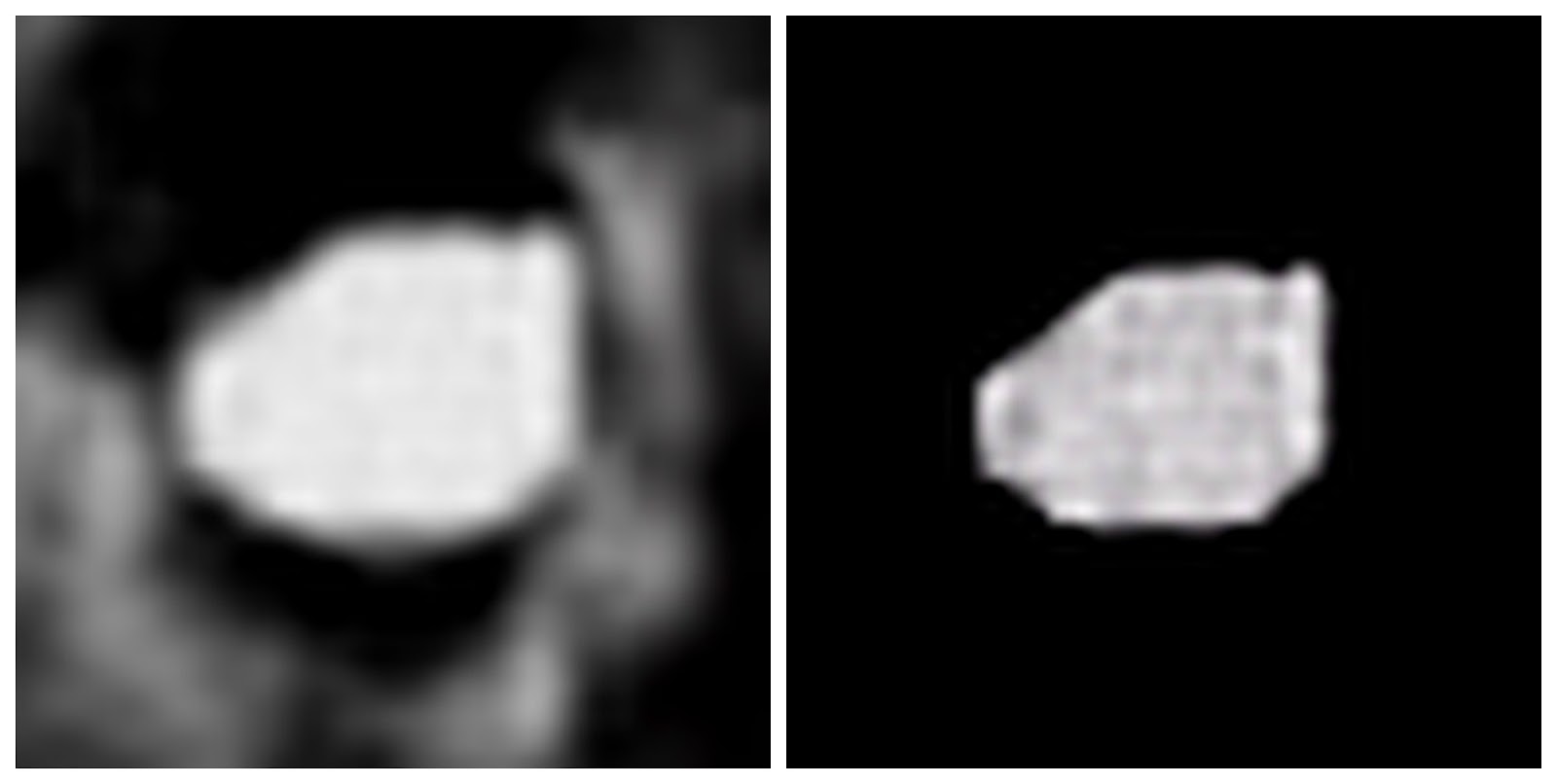
Figure 1 - UFO at video time 04.20 seconds -
The high-contrast image (at right) indicates a waffle-like surface.
Figure 2 - UFO at 04.44 seconds - The high-contrast
image (at right) shows a pattern of surface ridges.
Figure 3 - UFO at 05.32 seconds - The high-contrast
image (at right) shows sharper features near the outer edge.
Figure 4 - UFO at 06.44 seconds - Again, the high-contrast
image
 (at right) shows a pattern of surface ridges.
UFO features
I've tried examining this UFO's features (components and activities), after extracting its interpolated closeups and creating its slideshow. Trying to understand this object is difficult because its apparent composition is inconsistent, even among its images that share similar outlines. In any case, if the video is authentic (not a hoax), these closeups indicate that this UFO is probably an object of unknown origin.

UFO components - I cannot determine whether this UFO has separate components other than circular pits (craters?) and, possibly, a few surface ridges.

UFO activities - This UFO is flying in or near a layer of thin clouds. Its motion seems to push some clouds from its path. I cannot tell whether this object is tumbling, rotating, changing shape, or all three. Also, if the UFO has separate components, some might be changing shape independently.

4/10/2016

Viewing the UFO in MUFON case 71086

The Mutual UFO Network (MUFON) case 71086 includes a possibly-authentic video recording: Slow moving UFO captured on video over Alabama. This document summarizes my frame-by-frame analysis of part of that video. I've used open-source software to:
  1. Select interesting frames from the UFO video.
  2. Extract (crop and interpolate) UFO closeups (enlargements) from the frames.
  3. Create an online slideshow of UFO closeups.
  4. Examine the UFO's features, including its components and activities.
UFO video
At approximately 10:00 PM on October 1, 2015, in Ocean Beach, Alabama, a witness made a video recording of a UFO as it moved east to west slowly across the sky. The witness reported his UFO sighting to MUFON, which investigated the sighting and posted the video on YouTube.

Note: To view this video in slow motion or frame-by-frame, you can use either RowVid or Anilyzer. For more information, please see How to analyze UFO videos.

UFO closeups
Using procedures in Analyzing UFO videos through interpolated closeups, I've extracted interpolated closeups from various frames of the video in MUFON case 71086.

Each uninterpolated UFO closeup has relatively few pixels, typically between 200 and 2500. Therefore, we cannot see details as clearly as we prefer because each pixel appears as a relatively-large square. However, graphics software uses interpolation to calculate many new pixels among the uninterpolated pixels, which smooths out the squares. While not perfect, an interpolated closeup helps us see general shapes more clearly than would the patchwork of pixels in an uninterpolated closeup.

UFO slideshow
I've created an online slideshow, Closeups of the UFO in MUFON case 71086, which lets you see clear, large, sequential images. As you scroll through the slideshow, you can see how the object changes over time. I identify each closeup according to the time at which its frame had been recorded after the start of the video, at 00.00 seconds. This slideshow consists of closeups extracted from 27 frames, recorded at 0.04-second intervals, starting at time 48.14 and ending at time 49.18.

Note: My UFO slideshows are central to these analyses. I initiate each UFO-analysis project by creating a slideshow. Multiple, sequential images are more informative. No single image can show whether the object is making changes.

UFO features
I've examined this UFO's features (components and activities), after extracting its interpolated closeups and creating its slideshow. In my opinion, if the video is authentic (not a hoax), these closeups indicate that this UFO is probably an object of unknown origin.

UFO components - As shown in Figure 1, this UFO exhibits five major components: three circular components at the top and left, one circular component at the top right, and one compound component at the lower right. The middle component at the left seems to have a permanent extension. Circular components in the object usually seem to have dark centers and/or slots. The lower-right component seems to have three cylindrical subcomponents; the visible ends appear as three circles.
Figure 1 - UFO at 48.14 seconds - This object 
seems to be made mostly of solid materials.
UFO activities - Compare Figures 1 and 2 (both are also in the slideshow). The components of this UFO seem to make changes individually, but not as a grouping. Among the components, their relative positions remain static. Circular components in the object usually seem to have dark centers and/or slots. Components at the top and left make frequent shape and color changes. Components at the right make few changes, if any.
Figure 2 - UFO at 48.38 seconds. Though the UFO maintains its overall
shape, some of its components make changes to their shapes and colors.

4/06/2016

Analyzing UFO videos through interpolated closeups

This document can help you analyze UFO videos through the following process:
  1. Find a UFO video that is useful for analysis. 
  2. Identify interesting UFO behaviors and make screenshots of selected frames.
  3. Extract interpolated UFO closeups (enlargements) from selected frames. 
  4. Create a slideshow of sequential UFO closeups.
Note: This document includes specific procedures for analyzing YouTube UFO videos. For analyzing Facebook videos, you need slightly-different procedures. For more information, please see my document, How to analyze UFO videos.

Finding a UFO video useful for analysis
A UFO video can be useful for analysis if it meets the following requirements:
  • Published by a website not listed in the UFO Theater, which blacklists sites that promote phony UFO videos. 
  • Not an obvious hoax. Note: Always be careful, you can find video hoaxes on any UFO website.
  • Exhibits an authentic unknown object that is probably neither a natural phenomena nor a human aircraft.
  • Includes images that might be large enough. After you zoom a video frame, and crop its UFO image, you should see some its basic features. For example, a bright light can never exhibit features regardless how much you magnify it.
Identifying interesting UFO behaviors
After you find a useful UFO video, you can identify portions of that video in which the object is performing interesting behaviors, such as making changes to its:
  • Direction 
  • Speed 
  • Brightness 
  • Color 
  • Size 
  • Shape
To identify interesting UFO behaviors, do the following:
  1. Start playing a YouTube UFO video, pause it, and then copy its URL. Note: Play the video directly from the YouTube website. If you have accessed the video through a third-party website, click on the YouTube icon (tooltip: Watch on www.youtube.com) to watch the video directly through YouTube.
  2. Open a new browser tab, and do either of the following:
    • Go to RowVid, paste the URL into the ENTER VIDEO URL OR ID field, and click WATCH VIDEO.
    • Go to Anilyzer, paste the URL in the ENTER VIDEO URL field, select YouTube, and then click WATCH VIDEO.
  3. Click Settings (the gear icon), click Quality, and then select the highest possible quality; preferably 1080p.
  4. Watch the entire video, writing down times at which the most-interesting UFO behaviors occur. You can restart the video as often as necessary. 
  5. Within the video portion that contains each interesting action, do the following: 
    1. Click 0.25 for the slowest video speed. 
    2. Click either the forward or back arrow button to stop the video at a specific frame, and then continue clicking these buttons until you find a frame you wish to save as screenshot. 
    3. Click the icon at the lower right corner of YouTube, select Full screen, press Print Screen to display a Save Screenshot dialog, and then click Save to copy the screenshot of the frame to a working folder. Note: To keep track of your UFO screenshots, you should associate each filename with its video time. For example, I made a screenshot of a frame that had been recorded at 58.06 seconds, and then stored it as filename 5806.png in my working folder (You cannot use a decimal point in any number within a filename.)
Extracting interpolated UFO closeups
After you identify interesting portions of a UFO video, you can extract interpolated closeups of the unknown object performing an interesting action. To extract an interpolated UFO closeup, do the following:
  1. Create a screenshot of an interesting UFO action according to the above procedure for Identifying interesting UFO actions.
  2. Use image-editing software, such as GIMP, to zoom into the screenshot as closely as possible, typically 800%.
  3. Crop the UFO screenshot to approximately 50 by 50 pixels.
    Figure 1 - UFO screenshot cropped to 50 by 50 pixels.
    This is a closeup that has not yet been interpolated.
  4. Scale the image; resize it to 400 by 400 pixels, and use the best possible interpolation, such as Sinc (Lanczos3). This exhibits only the center portion of the image.
  5. To see the entire image, zoom out to 100%.
    Figure 2 - Interpolated UFO closeup at 100% zoom. 
  6. Save (export) the interpolated UFO closeup into a separate working folder. Note: For each each interpolated closeup, you can use a filename associated with its screenshot and video time. For example, I stored the interpolated UFO closeup in Figure 2 as filename 5806.jpg in a working folder.
As shown Figure 1, an uninterpolated UFO closeup has relatively few pixels, typically 2500 (50 X 50). Therefore, you cannot see details as clearly as you might prefer because each pixel appears as a relatively-large square. However, when you use graphics software, such as GIMP, to scale (resize) the closeup to a larger size, that software also uses interpolation to calculate many new pixels that smooth out the differences among the original pixels. As shown in Figure 2, an interpolated UFO closeup has many more pixels, typically 160,000 (400 X 400). Interpolation enhances the closeup and helps us see general shapes and features. While not perfect, an interpolated closeup shows more than it did prior to interpolation.

Creating a slideshow of interpolated UFO closeups
Creating a slideshow of sequential, integrated closeups can help you analyze UFO actions over time. You can use any slideshow or presentation software. For example, by uploading sequential interpolated closeups to Google Slides, I've created all my UFO-analysis slideshows associated with this blog.

    3/30/2016

    Viewing the UFO in MUFON case 53207

    The Mutual UFO Network (MUFON) case 53207 includes a possibly-authentic video recording: Oregon witness videotapes fast moving UFO. This document summarizes my frame-by-frame analysis of that video. I've used open-source software to:
    1. Select interesting frames from the UFO video.
    2. Extract (crop and interpolate) UFO closeups (enlargements) from the frames.
    3. Create an online slideshow of UFO closeups.
    4. Examine the UFO's features, including its components and activities.
    Note: To view this video in slow motion or frame-by-frame, you can use RowVid. For more information, please see How to analyze UFO videos.

    UFO video
    At approximately 10:05 PM on August 15, 2013, in LaGrande, Oregon, a witness made a video recording of a UFO as it moved quickly through the sky, rapidly changed shape and size, and then flew away suddenly. The witness and his wife reported their UFO sighting to MUFON. For more information, please see MUFON case 53207.

    UFO closeups
    I've extracted interpolated closeups from various frames of the MUFON case 53207 UFO video. I identify each closeup according to the time at which its frame had been recorded after the start of the video, at 00.00 seconds. For example, as I show in the caption for Figure 1, its frame had been recorded at 58.06 seconds after the start of the video.
    Figure 1 - UFO at 58.06 seconds. Above its brightest light,
    a dome seems visible. The witnesses reported that this UFO
    seemed to be "disk-shaped and had windows and a dome."
    Note: Each uninterpolated UFO closeup has relatively few pixels, typically between 200 and 2500. Therefore, we cannot see details as clearly as we prefer because each pixel appears as a relatively-large square. However, graphics software uses interpolation to calculate many new pixels among the uninterpolated pixels, which smooths out the squares. While not perfect, an interpolated closeup helps us see general shapes more clearly than would the patchwork of pixels in an uninterpolated closeup.

    Figures 2 through 7 are six sequential closeups from the MUFON case 53207 video that show the UFO changing shape. Assuming that the video camera recorded at approximately 25 frames per second, this six-closeup sequence has five 0.04-second intervals that start at video time 51.78 seconds and end at 51.98 seconds. Therefore, these six closeups consist of images recorded for a total of 0.20 seconds (5 X 0.04 = 0.20).
    Figure 2 - UFO at 51.78 seconds. At this instant, the object is relatively dim.
    Figure 3 - UFO at 51.82 seconds. The object begins to brighten.
    Figure 4 - UFO at 51.86 seconds. The object begins to grow.
    Figure 5 - UFO at 51.90 seconds. Not much change in this interval.
    Figure 6 - UFO at 51.94 seconds. The object becomes
    more complex as it grows many columns vertically.
    Figure 7 - UFO at 51.98 seconds. Components at the left begin to dim.
    Important: For more sequential images, please see my slideshow, Closeups of the UFO in MUFON case 53207. To create the slideshow, I've extracted 25 sequential closeups from the MUFON case 53207 video. By scrolling through the slideshow, you can watch the UFO make multiple interesting changes to its shape and size.

    UFO characteristics
    In my opinion, if the MUFON case 53207 video is authentic, the UFO is an object of unknown origin. Although I know neither the size of the object nor the distance between it and the video camera, I think this UFO demonstrates unusual capabilities by rapidly changing shape, size, color, and brightness.

    3/17/2016

    Viewing a UFO over Aguadilla

    This document summarizes my frame-by-frame analysis of a possibly-authentic UFO video shown in the document, Leaked UFO recorded by Department of Homeland Security. I've used open-source software to:
    1. Select interesting frames from the UFO video.
    2. Extract (crop and interpolate) UFO closeups (enlargements) from the frames.
    3. Create an online slideshow of UFO closeups.
    4. Examine the UFO's features, including its components and activities.
    Note: To view this video in slow motion or frame-by-frame, you can use RowVid. For more information, please see How to analyze UFO videos.

    UFO video
    At 9:20 PM on April 25, 2013, in Aguadilla, Puerto Rico, a U.S. Customs and Border Protection aircraft crew made an infrared video recording of a UFO as it approached from the Atlantic ocean, flew at low altitude across land, split into two objects, and then submerged into the ocean. Fortunately, an infrared video camera was available because the unlighted UFO was flying at night.

    UFO closeups
    I've extracted two sets of interpolated closeups from various frames of the Aguadilla UFO video:
    Note: Each uninterpolated UFO closeup has relatively few pixels, typically between 200 and 2500. Therefore, we cannot see details as clearly as we prefer because each pixel appears as a relatively-large square. However, graphics software uses interpolation to calculate many new pixels among the uninterpolated pixels, which smooths out the squares. While not perfect, an interpolated closeup helps us see general shapes more clearly than would the patchwork of pixels in an uninterpolated closeup.

    Sequential UFO closeups - For the slideshow, I've extracted 28 sequential closeups from near the beginning of the Aguadilla video, at time 0:44. The infrared video camera recorded at approximately 30 frames per second (0.033-second intervals). Therefore, the slideshow presents images recorded for a total of 0.93 seconds (28 X 0.033 = 0.93).

    Separate UFO closeups - For this document, I've extracted the five closeups below from the Aguadilla video within times 2:02 through 2:46.  After splitting into two equal objects, each as large as the original, one object submerges, and then the other. Neither UFO resurfaces.

    Figure 1 - Time 2:02 - The UFO is flying 
    above the surface of the Atlantic ocean.
    Figure 2 - Time 2:04 - At 90 mph, the UFO skims the surface and
    submerges partially. It disturbs the water only slightly, if at all, and
    doesn't leave a wake. Likewise, hitting the water doesn't slow the UFO.  
    Figure 3 - Time 2:36 - After running fully submerged several times
    (not shown in these closeups), the UFO splits into two objects,
    each as large as the original. Both objects run partially submerged.
    Figure 4 - Time 2:43 -  Both objects are still running partially submerged.
    Figure 5 - Time 2:46 - Only one UFO
    appears briefly before disappearing.
    UFO characteristics
    In my opinion, if the Aguadilla UFO video is authentic, its object is almost certainly an object of unknown origin. In the video, the UFO appears to be tumbling, and occasionally changing shape. It was a small object, approximately 3 to 5 feet long, and flying at speeds varying between 40 to 120 mph. Its physical construction, composite materials, source of power, and method of propulsion are unknown. Without lights, it avoided obstacles while flying in nighttime darkness. Thanks to the infrared video recording, researchers estimate that its exterior temperature was at least 105ยบ Fahrenheit.

    For more information, please see the 161-page detailed report about this UFO in Aguadilla, Puerto Rico, provided by the Scientific Coalition of UFOlogy (SCU). Thanks to the SCU, this Aguadilla UFO might be one of the most thoroughly-documented UFO incidents in history. Their report is a PDF file that you can view online, and download to view offline if you wish.


    3/08/2016

    Viewing a UFO crossing the Moon

    This document summarizes my frame-by-frame analysis of a possibly-authentic UFO video that shows an object crossing the Moon. I've used open-source software to:
    1. Select interesting frames from the UFO video.
    2. Extract (crop and interpolate) UFO closeups (enlargements) from the frames.
    3. Create an online slideshow of UFO closeups.
    4. Examine the UFO's features, including its components and activities.
    Note: If you're curious, you too can analyze UFO videos, frame by frame. For more information, please see How to analyze UFO videos.

    UFO video
    While making a video of the Moon, Tom Dozier recorded a UFO crossing the Moon. On 02-21-2016, Tom posted the video on his Facebook page. He writes, "Satellite? Asteroid? Aliens? I was shooting some night video of the moon and caught this. What is it and how big is it to be seen crossing the moon?"

    UFO closeups
    I've extracted interpolated closeups from 35 sequential frames of the above Moon-crossing UFO video. I published these frames in a slideshow, Closeups of a UFO crossing the Moon. Figures 1 through 7 show seven sequential closeups that I've borrowed from my slideshow.

    Notes:
    • The typical video camera records approximately 25 frames per second. Therefore, within 35 sequential frames, the images occur at 0.04-second intervals, for a total of 1.4 seconds (35 X 0.04 = 1.4).
    • Each uninterpolated UFO closeup has relatively few pixels, typically between 200 and 2500. Therefore, we cannot see details as clearly as we prefer because each pixel appears as a relatively-large square. However, graphics software uses interpolation to calculate many new pixels among the uninterpolated pixels, which smooths out the squares. While not perfect, an interpolated closeup helps us see general shapes more clearly than would the patchwork of pixels in an uninterpolated closeup.
    Figure 1 - The UFO seems to have a complex structure.
    Figure 2 - The lower section seems to have moved upward.
    Figure 3 - The upper section grows complex, and the
    dark middle section seems to be forming a triangle.
    Figure 4 - The upper section continues changing.
    Figure 5 - The lower section changes greatly.
    Figure 6 - A triangle (similar to that in Figure 3) has reappeared. 
    Figure 7 - The upper-left corner changes greatly,
    which adds more complexity to the upper section.
    UFO characteristics
    In my opinion, if Tom Dozier's UFO video is authentic, the object is an object of unknown origin. There is no way to estimate its size because we do not know whether the UFO is close to the Moon, close to Earth, or somewhere between. Figures 1 through 7, and all the other slides show the UFO rapidly rotating and/or changing shape. Moreover, certain features of this UFO seem to change shape while its other features remain static.

    3/06/2016

    Viewing a UFO over Rio de Janeiro

    This document summarizes my frame-by-frame analysis of a possibly-authentic UFO video shown in UFO recorded during flight over Rio de Janeiro. I've used open-source software to:
    1. Select interesting frames from the UFO video.
    2. Extract (crop and interpolate) UFO closeups (enlargements) from the frames.
    3. Create an online slideshow of UFO closeups. Important: My slideshow, Closeups of a UFO over Rio de Janeiro, shows many more images than I can include in this document.
    4. Examine the UFO's features, including its components and activities.
    Note: If you're curious, you too can analyze UFO videos, frame by frame. For more information, please see How to analyze UFO videos.

    UFO video
    Near Rio de Janeiro, on 10-12-2013, a UFO reportedly followed a private plane for approximately 25 minutes. There were three witnesses: the pilot, his copilot, and Rodrigo Andrade, a Brazilian singer and actor who recorded the UFO video. Concerned about possible repercussions, the witnesses did not report the UFO until 12-31-2015. For more information, please see Famous Actor Films UFO Chasing A Plane In Brazil.

    UFO closeups
    I've extracted interpolated closeups from from various frames of the above Rio UFO video. Figures 1 through 6 show closeups from six sequential frames. A video camera records approximately 25 frames per second. Therefore, within this sequence, the images occur at 0.04-second intervals (relative times 0.00 through 0.20).

    Note: Each uninterpolated UFO closeup has relatively few pixels, typically between 200 and 2500. Therefore, we cannot see details as clearly as we prefer because each pixel appears as a relatively-large square. However, graphics software uses interpolation to calculate many new pixels among the uninterpolated pixels, which smooths out the squares. While not perfect, an interpolated closeup helps us see general shapes more clearly than would the patchwork of pixels in an uninterpolated closeup.

    Figure 1 - Starting this sequence at time 0.00,
    the 
    object that seems to have a specific structure.
    Figure 2 - At time 0.04, the object has morphed into an
    interim shape. It seems to have stretched in two directions.
    Figure 3 - At time 0.08, the object seems similar to its time-0.00 shape.
    Figure 4 - At time 0.12, the object seems to change its lower
    portion. Often, some features change while others remain static.
    Figure 5 - At time 0.16, the object seems to
    change shape, possibly while rotating clockwise.
    Figure 6 - At time 0.20, the object is still changing shape.
    (It continues doing so throughout the entire video.)
    Note: For more closeups that I've extracted from the Rio UFO video, please see my slideshow, Closeups of a UFO over Rio de Janeiro.

    UFO characteristics
    In my opinion, if the Rio UFO video is not a hoax, it is an object of unknown origin. There is no way to estimate its size because we do not know the distance between the plane and the UFO. Its composition is unknown because its shape changes continuously throughout the video. It seems to be made of multiple parts that change shape and/or move at differing rates. Sometimes, components seem to dissolve into a gas that later solidifies into new components.